 Revolution Editor
SwiftUI
Build a Wii app from SwiftUI-style views.
How it works
Choose Swift: SwiftUI app when you create a project. You write a View with a body, like on the Mac. Revolution Editor translates it to C and draws the view tree every frame, so @State changes show straight away.
Example
import SwiftUI

@main
struct CounterApp: App {
    var body: some Scene {
        WindowGroup { ContentView() }
    }
}

struct ContentView: View {
    @State private var count = 0
    @State private var on = true

    var body: some View {
        VStack(spacing: 16) {
            Text("Count: \(count)").font(.title)
            Button("Add") { count += 1 }
            Toggle("Sound", isOn: $on)
        }
        .padding(24)
    }
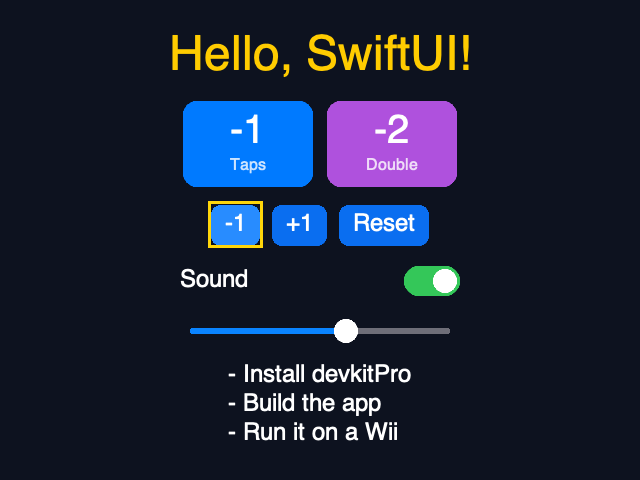
}
Views and modifiers
Text,Image,VStack,HStack,ZStack,Spacer,Divider,Group,ForEach,Button,Toggle,Slider,ProgressView, and the shapesRectangle,RoundedRectangle,Circle,Capsule.padding,frame,background,foregroundColor,font,opacity,offset,cornerRadius,border,onTapGesture,onAppear,disabled, plusposition,underline,shadow(a simple offset shadow),clipShape(rounded shapes become rounded corners),overlay(a colour),onLongPressGesture(hold A),taskandonChange(of:).@Stateand@Binding($value). Your own views can take parameters and bindings.- Every other SwiftUI modifier is accepted so your code builds, and ignored when it has no meaning on a Wii: text styling such as
boldanditalic, animation and transitions, accessibility, keyboard and hover, lists and scrolling, navigation, toolbars, sheets and alerts, the environment, and the watchOS/macOS/tvOS-only ones (digitalCrownRotation,containerBackground,onExitCommand,menuBarExtraStyle,statusBar,defersSystemGestures).
On the Wii, point and press A to click. The D-pad moves a focus ring.
What doesn't
NavigationStack, List scrolling, gestures other than tap and long press, @Observable models, Combine and animation. Use plain Swift types and ForEach instead.